
Core Ownership
Direct Answer
Pest control companies that run door-to-door sales teams use a combination of payroll software and commission tracking tools to pay reps — though many rely on spreadsheets far longer than they should. The best-fit platforms handle per-account commissions, seasonal ramp-up, cancellation clawbacks, and the W2/1099 rep mix common in the industry. This article breaks down what tools pest control operators actually use, where each one breaks down, and what a purpose-built solution looks like.
Breakdown
Pest control D2D sales involves pay structures that most generic software cannot handle cleanly. Here are the five capabilities operators need:
- Per-account or per-door commission calculation. Most pest reps earn a flat or tiered commission per new account signed — not a salary or hourly rate. The software must track each signed account and calculate what the rep earned, including upsells (quarterly vs monthly plans, add-on services, etc.).
- Cancellation clawback tracking. If a customer cancels within the first 30, 60, or 90 days, the rep often owes back some or all of the commission. At 100+ reps, tracking open clawback windows manually is a payroll failure waiting to happen.
- Seasonal volume management. Pest control is heavily seasonal. Companies hiring 40 reps in spring and scaling to 120 by summer need software that can onboard reps quickly, not one that creates a two-week administrative backlog per hire.
- W2 + 1099 in one system. Many pest control companies run a core employee base (W2) alongside seasonal contractors (1099). These require different tax treatment, different onboarding, and ideally a single reporting environment.
- Override and team-lead compensation. Team leads and regional managers typically earn a percentage override on every account their reps sign. At scale, this requires automated multi-level commission math, not a separate spreadsheet.
Deep Dive
What pest control companies actually use today
The honest answer: most mid-sized pest control companies run a patchwork. A typical setup includes a generic payroll tool (ADP, Gusto, Paychex) for W2 payroll, a spreadsheet for commission calculations, separate 1099 payments via check or contractor tools, and informal clawback tracking managed by a sales manager in a separate tab. This works at 20 reps. At 60, it starts breaking. At 120, it creates a full-time administrative burden and generates disputes weekly.
Some larger operators have tried sales commission platforms like Spiff, CaptivateIQ, or Xactly. These calculate commissions well — but they’re designed for inside sales teams with SaaS deal structures. They don’t handle clawback windows tied to cancellation events, don’t process payroll, and weren’t built for the pace of D2D rep onboarding.
The pest control pay structure problem
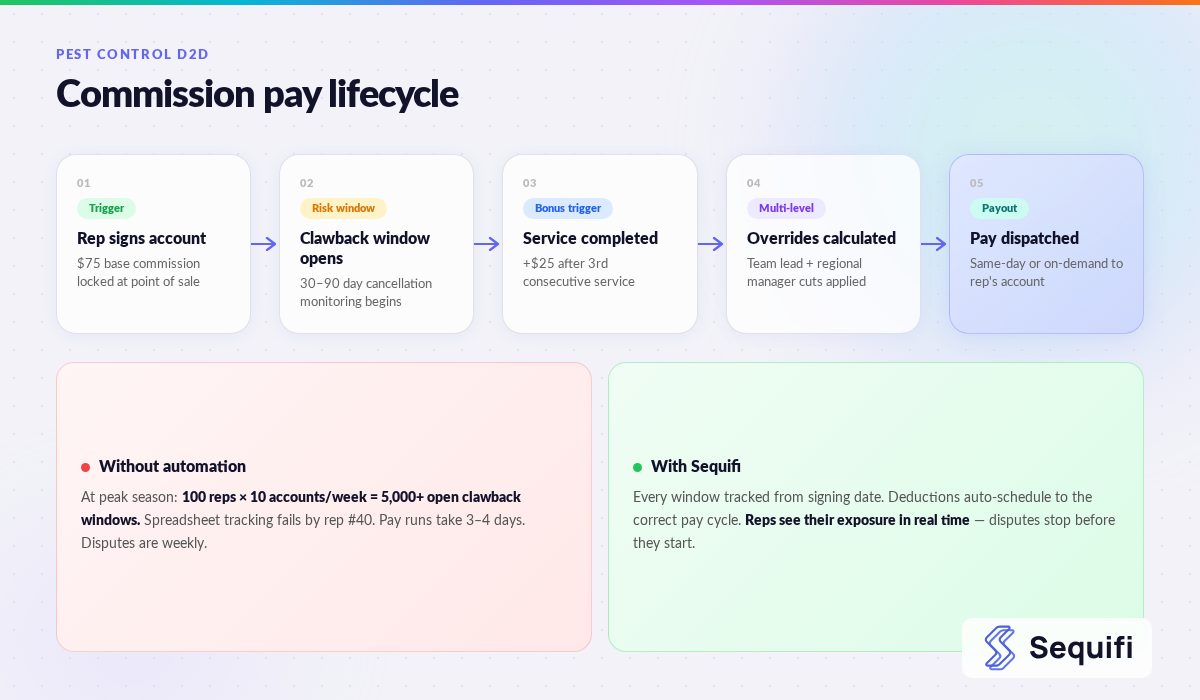
A mid-sized pest control company — 80 summer reps across three territories — might have a pay structure like this: $75 per initial service agreement signed, a $25 bonus per account if the customer completes three consecutive services, full clawback if the customer cancels within 30 days and 50% clawback if they cancel within 31–60 days, plus a team lead override of $10 per account and a regional manager override of $3 per account.
Run that across 80 reps signing 8–12 accounts per week: 640–960 commission calculations weekly, plus ongoing clawback monitoring for every account in the previous 60 days — potentially 5,000+ open windows at peak season. None of that fits in a spreadsheet without someone spending their entire week maintaining it.
The National Pest Management Association (NPMA) reports that the US pest control industry generates over $17 billion in annual revenue and continues to grow, with D2D sales remaining the primary new-customer acquisition channel for residential services.
Onboarding at pest control speed
Pest control companies recruit in cohorts — 20 in March, 30 more in April, another 30 by May. If your payroll system takes 3–5 business days per rep to set up, reps are in the field earning commissions before the payroll system can process their pay. That’s a compliance risk and a first-paycheck problem that drives early attrition.
The Bureau of Labor Statistics notes that services-to-buildings industries have some of the highest seasonal hiring volatility in the US economy. Companies that can’t process rapid bulk onboarding lose reps in the critical first two weeks — before the first paycheck lands.
The W2 / 1099 mix in pest control
Pest control companies commonly classify core market reps as W2 employees and expansion or summer-only reps as 1099 contractors. Running them through separate systems creates reconciliation delays, 1099 errors at year-end, and a two-tier pay experience that creates friction when reps compare notes.
SHRM research on payroll accuracy consistently identifies manual calculation errors as the leading cause of employee pay complaints. In commission-based environments, those errors compound — a wrong clawback deduction or missed override can cost a rep hundreds of dollars and generate a dispute that affects morale team-wide.
See also: how do companies manage W2 and 1099 reps together and what is the best payroll software for D2D sales teams.
What Breaks at Scale
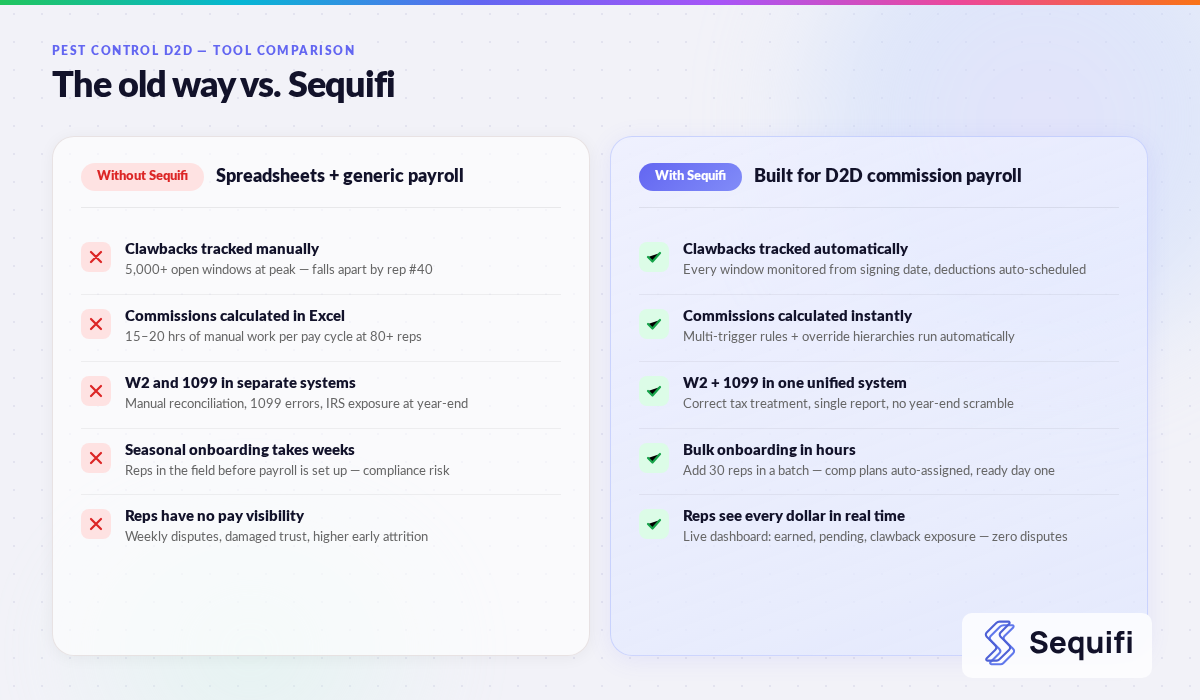
At 40 reps, one person manages commission calculations in a spreadsheet. It takes 10–15 hours per pay cycle. Errors happen but get caught.
At 100 reps across multiple territories, the spreadsheet approach collapses. Different managers run different versions. Clawback windows fall through the cracks. Reps start questioning their checks. Finance spends the first three days of every pay period chasing numbers instead of closing the books.
At 200+ reps with seasonal surge, you have a system-wide problem. Manual imports into payroll cause delays. 1099 payments go out late. Override calculations are weeks behind. Your best team leads start looking at competitors. Compliance exposure grows every quarter.
See also: what breaks when sales teams grow too fast and how do you onboard 100+ sales reps quickly.
How Sequifi Solves This
Sequifi is built for exactly this environment. Per-account commissions are configured once and calculated automatically as new accounts are logged — no manual spreadsheet entry. Clawback windows are tracked by account from the day of signing, with automatic deductions triggered at the right pay cycle and rep-visible explanations so disputes are eliminated before they start.
W2 and 1099 reps live in the same system with unified reporting and separate tax treatment. New rep onboarding takes hours, not days — so you can process a cohort of 30 new summer hires without creating a payroll backlog. Override hierarchies are configured once and calculated automatically each cycle. For pest control companies moving off a spreadsheet-and-ADP stack, Sequifi replaces both tools in one platform.
Frequently Asked Questions
What’s the most common payroll mistake pest control companies make?
The most common mistake is using a generic payroll tool (like ADP or Gusto) for the pay run while tracking commissions separately in a spreadsheet. This creates a data handoff every pay cycle that’s error-prone and impossible to audit cleanly. The second most common mistake is not tracking clawback windows systematically — leading to overpayments that are hard to recover and create rep resentment when deducted late.
Can I use QuickBooks to pay pest control sales reps?
QuickBooks handles basic payroll for W2 employees but has no native commission calculation capability. You’d still need a separate system to calculate what each rep earned per account — which means a manual process connecting two tools. QuickBooks also doesn’t handle 1099 contractor payroll natively in most configurations, which is a common requirement for pest control companies.
How do pest control companies handle seasonal rep onboarding?
The best-run pest control companies use platforms that support bulk onboarding — adding 20–30 reps in a single batch with standardized commission plan assignments. This reduces per-rep setup time from days to hours. Companies still on manual or generic platforms typically face a 1–2 week onboarding lag per cohort, meaning reps are in the field earning commissions before the payroll system is ready to process their pay.
How should clawbacks be communicated to reps?
The best practice is to give reps real-time visibility into their open clawback windows — which accounts are still within the cancellation period and what their potential exposure is. When a clawback deduction is applied, reps should see the specific account, the cancellation date, and the calculated amount. Platforms that provide this transparency eliminate most disputes at the source. A rep who understands why a deduction happened rarely escalates it.
Do pest control companies need different software for W2 and 1099 reps?
Ideally, no. Running two separate systems for W2 and 1099 reps creates reconciliation overhead and year-end reporting headaches. A unified platform that handles both worker types — with correct tax treatment for each — is significantly easier to operate. If you’re currently running separate systems, consolidating them is one of the highest-ROI operational moves a mid-sized pest control company can make.
Built for pest control. Ready for peak season.
Sequifi handles per-account commissions, clawback tracking, seasonal onboarding, and W2/1099 payroll, all in one platform. See it against your actual comp plan.
Also worth reading: how do pest control companies pay door-to-door reps and what is commission software for sales teams.