
Quick Answer
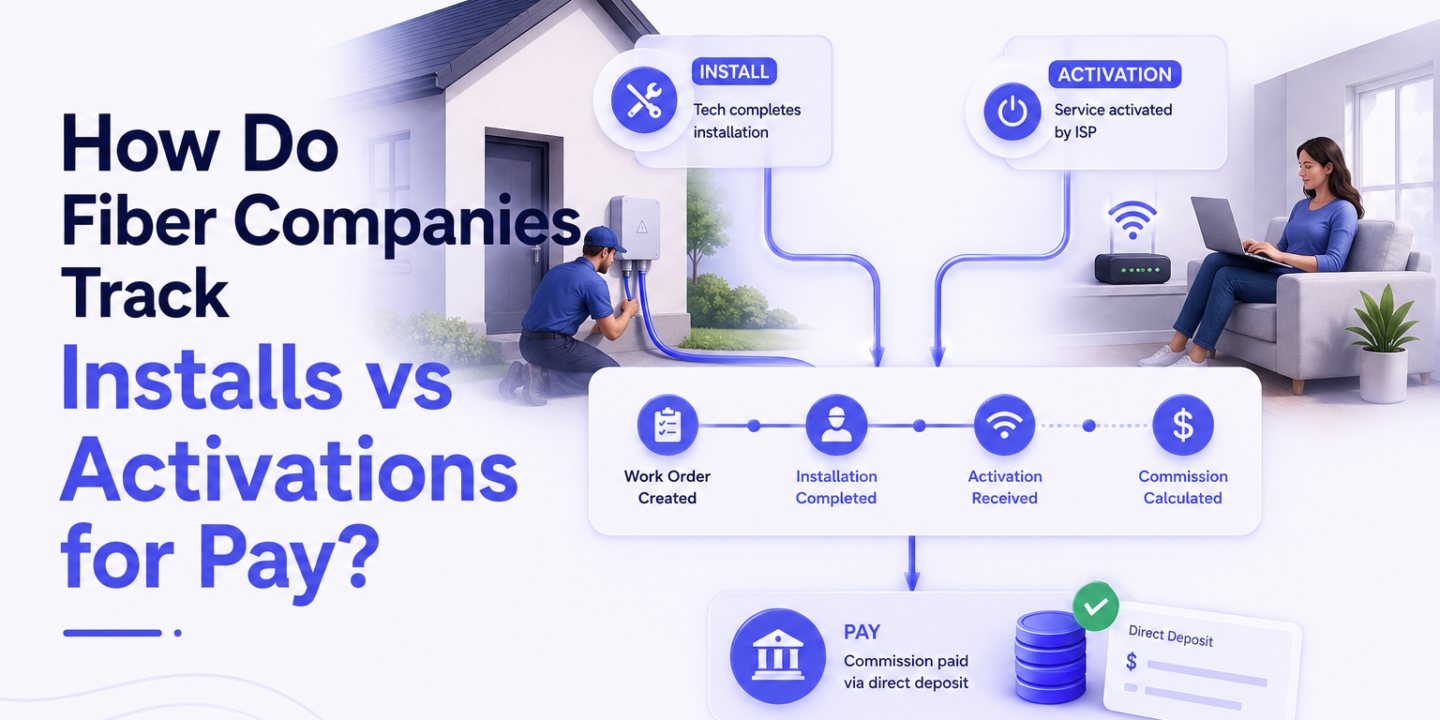
Fiber install tracking connects two separate events — the physical installation and the network activation — and determines which one triggers the rep’s commission. Most fiber ISPs use a combination of field service management tools, network provisioning systems, and CRM data to capture both events. The problem is these systems rarely share data natively, so joining install and activation records for commission calculation is manual work at most shops.
This guide explains how the tracking works, which event models ISPs use for pay, and how leading fiber organizations automate the connection between field data and commission payouts.
Install vs Activation: Why the Difference Matters for Pay
Fiber install tracking starts with understanding that “install” and “activation” are distinct events — and the gap between them can be days or weeks.
Install: The field technician visits the address, runs the drop, installs the ONT or modem, and marks the work order complete. The equipment is in place. Signal may be active. But the customer’s account may not yet be live in the billing system.
Activation: The customer’s service account goes live. Billing starts. The network provisioning system confirms the modem is online and the account is assigned to an active subscriber record.
Why do they diverge? A tech may complete an install while the customer is at work — no one home to confirm setup. Back-office provisioning has a processing delay. The customer calls in later to complete setup. Or the install job was marked done but a provisioning error kept the account from activating.
For commission purposes, the difference is significant. Paying on install means paying before you know if the service actually activated. Paying on activation ensures the product was delivered — but delays the rep’s payout by days or weeks. Most mature fiber ISPs have moved toward an activation-based or dual-trigger pay model precisely because of this gap.
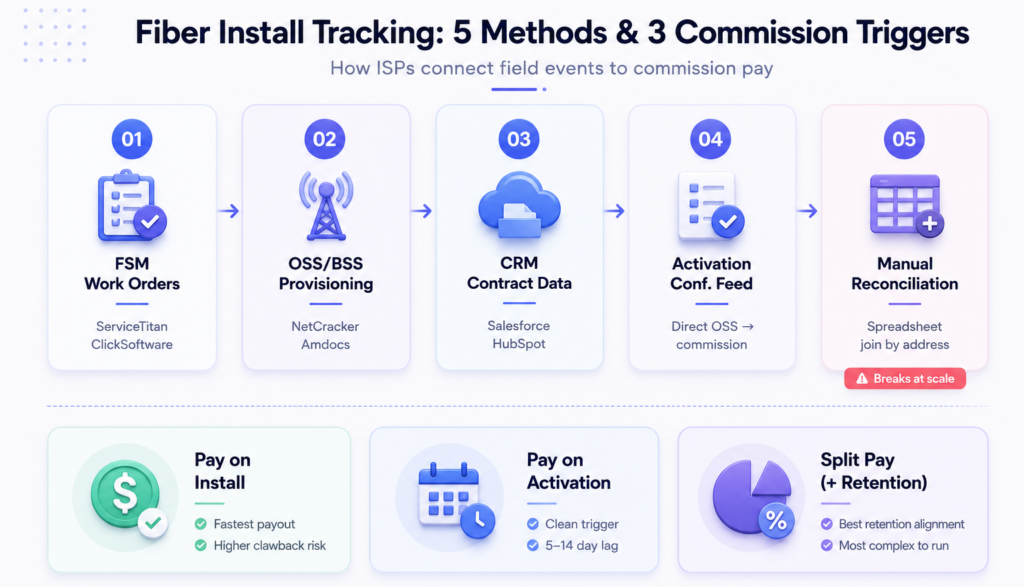
5 Ways Fiber Companies Track Installs and Activations
1. Field Service Management (FSM) Tools
The FSM tracks work orders from dispatch through completion. When a tech marks a job done in the FSM, that timestamps the install event. Common platforms in fiber: <a href=”https://www.servicetitan.com” rel=”noopener noreferrer”>ServiceTitan</a>, <a href=”https://www.clicksoftware.com” rel=”noopener noreferrer”>ClickSoftware</a>, and proprietary operator-built dispatch systems.
FSM data captures: tech ID, address, work order type, completion timestamp, and job notes. It does not capture whether the network activated.
2. OSS/BSS Network Provisioning Systems
The OSS (Operations Support System) handles network provisioning — assigning the ONT to a subscriber, enabling the port, confirming signal. The BSS (Business Support System) handles billing and account management.
Activation lives here. When the OSS confirms the modem is online and the BSS creates an active billing record, that’s the activation event. These systems are often the incumbent telco platform — <a href=”https://www.netcracker.com” rel=”noopener noreferrer”>NetCracker</a>, <a href=”https://www.amdocs.com” rel=”noopener noreferrer”>Amdocs</a>, or a regional ISP-built stack.
3. CRM Lead-to-Contract Tracking
The CRM tracks the rep’s activity from door knock through signed contract. When a contract is signed, the CRM records the rep ID, address, and contract date. This is where the sales credit lives — but it’s upstream of both install and activation.
Fiber D2D teams commonly use <a href=”https://www.salesforce.com” rel=”noopener noreferrer”>Salesforce</a> or <a href=”https://www.hubspot.com” rel=”noopener noreferrer”>HubSpot</a> for this. Territory management tools like <a href=”https://www.salesrabbit.com” rel=”noopener noreferrer”>SalesRabbit</a> add door-level tracking on top.
4. Activation Confirmation Feeds
Some fiber ISPs build a direct feed from the OSS to their commission system — when a new subscriber activates, that event triggers a commission calculation. This is the gold standard: real-time activation data flowing to pay logic automatically. It requires integration work, but it eliminates manual lookup entirely.
5. Manual Reconciliation Reports
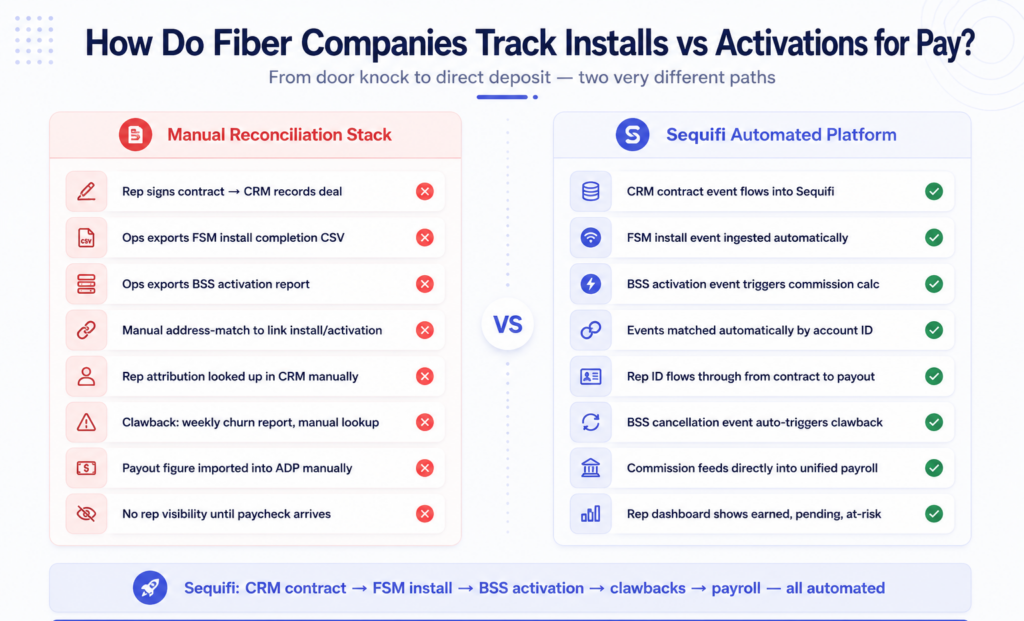
At most mid-size fiber ISPs, fiber install tracking for commission is still a manual process. Ops pulls a weekly install completion report from the FSM, a weekly activation report from the BSS, joins them on address or account ID, and produces a commission-eligible list. At 50 reps, this is a half-day task. At 200 reps, it’s a dedicated headcount.
According to <a href=”https://www.ntca.org” rel=”noopener noreferrer”>NTCA – The Rural Broadband Association</a>, rural fiber deployment is accelerating rapidly — which means more ISPs are scaling D2D teams faster than their back-office infrastructure can keep up. The <a href=”https://www.fcc.gov/consumers/guides/broadband-speed-guide” rel=”noopener noreferrer”>FCC’s broadband expansion initiatives</a> are pushing even smaller operators into high-growth field sales territory where manual tracking breaks fast.
The 3 Commission Trigger Models Fiber ISPs Use
How a fiber ISP structures pay determines what data they need to capture — and how fast errors compound when that data is wrong.
Model 1: Pay on Install Completion
Commission triggers when the field tech marks the work order done in the FSM.
Pro: Fastest payout for reps — reduces time between door knock and earning. Strong recruiting advantage.
Con: Pays before confirming the customer is actually using the service. Higher clawback exposure when accounts never activate or churn within days.
Model 2: Pay on Network Activation
Commission triggers when the OSS/BSS confirms the subscriber is live on the network.
Pro: Clean, unambiguous trigger — the product was delivered. Lower false-positive payout rate.
Con: Longer lag between install and payout — sometimes 5–14 days. Reps feel the delay, especially in high-volume months.
Model 3: Split Pay (Install + Retention)
Partial commission at activation, remainder at 30/60/90-day retention check.
Pro: Aligns rep incentive with customer retention. Reduces gaming (signing customers who cancel immediately).
Con: Most complex to administer. Requires two separate data pulls per account — one at activation, one at the retention checkpoint. Manual systems can’t reliably execute this at scale.
For a full breakdown of multi-trigger payout automation, see How do companies automate commission payouts?.
The Churn Window and Clawbacks
Every fiber ISP has a cancellation window — typically 30 to 90 days from activation — where a rep’s commission is clawed back if the customer cancels.
Churn clawbacks are where fiber install tracking systems most commonly fail at scale.
The problem: the activation data lives in the BSS. The cancellation event also lives in the BSS — but months later. The commission system needs to receive that cancellation event, match it to the original activation record, identify the rep who earned the commission, and calculate the clawback amount. Then it needs to reduce the rep’s next pay cycle accordingly.
When this is done manually: someone in ops monitors a weekly churn report, looks up the original activation date, finds the rep, and adjusts the spreadsheet. When done at scale, this breaks. Missed clawbacks mean overpayments. Delayed clawbacks mean rep disputes. Both erode trust.
See What software do fiber D2D teams use? for how the full tech stack fits together.
What Breaks When the Data Doesn’t Connect
The five tracking methods above each produce data in isolation. The commission problem is connecting them.
Install without activation match. If the FSM work order and the BSS activation record can’t be reliably matched — because the address format differs, or the account ID wasn’t passed through — ops has to resolve them manually. At volume, that’s 20–40 exception tickets per pay cycle.
Activation without rep attribution. The BSS knows a subscriber activated. It may not know which rep sold the original contract — especially if the CRM didn’t pass the rep ID to the install workflow properly. Commission is unattributable until someone traces it back manually.
Clawbacks without automation. A churn event in the BSS with no automated path to the commission system means every cancellation is a manual ops task. Reps who dispute the calculation have no way to verify it independently.
Rep visibility gap. Reps who can’t see their own install/activation status generate constant “where’s my commission?” inbounds. That’s not a rep behavior problem — it’s a data visibility problem.
For the broader picture of what scaling breaks, see What breaks when sales teams grow too fast?.
How Sequifi Automates Fiber Install Tracking for Commission
Sequifi was built for D2D and field sales organizations where commission depends on back-office events — exactly the install/activation problem fiber ISPs face.
Event ingestion. CRM contract data, FSM install completions, and BSS activation feeds all flow into Sequifi. No manual export. Each event is timestamped and tagged to the rep who owns the account.
Commission rules engine. Sequifi applies your trigger logic — pay on activation, split pay, retention bonuses, churn clawback windows. When an activation event arrives, the rules engine calculates the payout automatically. When a cancellation event arrives within the clawback window, it adjusts the next pay cycle automatically.
Rep pay dashboard. Every rep sees exactly what they’ve earned, what’s pending activation, and what’s at risk from open churn windows. Dispute volume drops because reps have data — not just a paycheck.
Unified payroll. W2 and 1099 reps in the same system. Every calculated payout flows directly into payroll. One data model from signed contract to direct deposit.
The result: ops stops spending 2–3 days per cycle reconciling install reports against activation reports against clawback lists. See How do fiber companies pay door-to-door reps? for the full pay structure context.
According to <a href=”https://www.bls.gov/ooh/sales/sales-representatives-wholesale-and-manufacturing.htm” rel=”noopener noreferrer”>Bureau of Labor Statistics</a> data on field sales turnover, inaccurate or opaque pay is among the leading drivers of rep departure. See Does faster pay help recruit better sales reps? for the direct data.
Learn more at sequifi.com.
Frequently Asked Questions
What is the difference between a fiber install and a fiber activation?
A fiber install happens when a field technician completes the physical setup — ONT in, drop run, equipment configured. An activation happens when the customer’s service account goes live in the billing system and the network confirms the subscriber is online. These can be minutes apart or days apart depending on provisioning workflows.
Do fiber companies pay commission at install or activation?
Most mature fiber ISPs pay at activation or use a split model (partial at activation, remainder at a 30/60/90-day retention check). Paying at install is faster for reps but carries higher clawback exposure. Paying at activation is the more common standard because it confirms the product was actually delivered.
How do fiber ISPs handle commission clawbacks for early cancellations?
When a customer cancels within the clawback window (typically 30–90 days from activation), the rep’s commission is partially or fully recovered. In automated systems, the cancellation event flows from the BSS to the commission platform, which calculates the clawback and reduces the next pay cycle. In manual systems, this is a spreadsheet lookup — which is how errors pile up at scale.
What systems do fiber companies use to track installs?
The most common setup is a field service management (FSM) tool for work order tracking, an OSS/BSS for network provisioning and billing, and a CRM for sales activity. The challenge is that none of these systems were designed to share data for commission purposes — the joins are manual.
How does Sequifi connect install tracking to commission pay?
Sequifi ingests events from your CRM (contract data), FSM (install completions), and BSS (activation and cancellation events). The rules engine applies your comp plan — activation triggers, split-pay logic, clawback windows — and produces auditable payouts per rep per cycle. No manual reconciliation.
Conclusion
Fiber install tracking for commission is an operational data problem disguised as a comp plan problem. The structures are usually straightforward — pay on activation, split pay, clawback window. The failure is always in connecting the events: install completions from the FSM, activations from the BSS, cancellations from customer service.
At 30 reps, you can manage those connections manually. At 100+ reps, the manual approach generates errors, disputes, and rep churn that cost more than the ops team running the spreadsheet.
Sequifi automates the event connections — so the right pay goes to the right rep at the right time, with a full audit trail behind every number. Visit sequifi.com to see how it works for fiber ISPs.
Related: What software do fiber D2D teams use? · How do fiber companies pay door-to-door reps? · How do companies automate commission payouts?