
Quick Answer
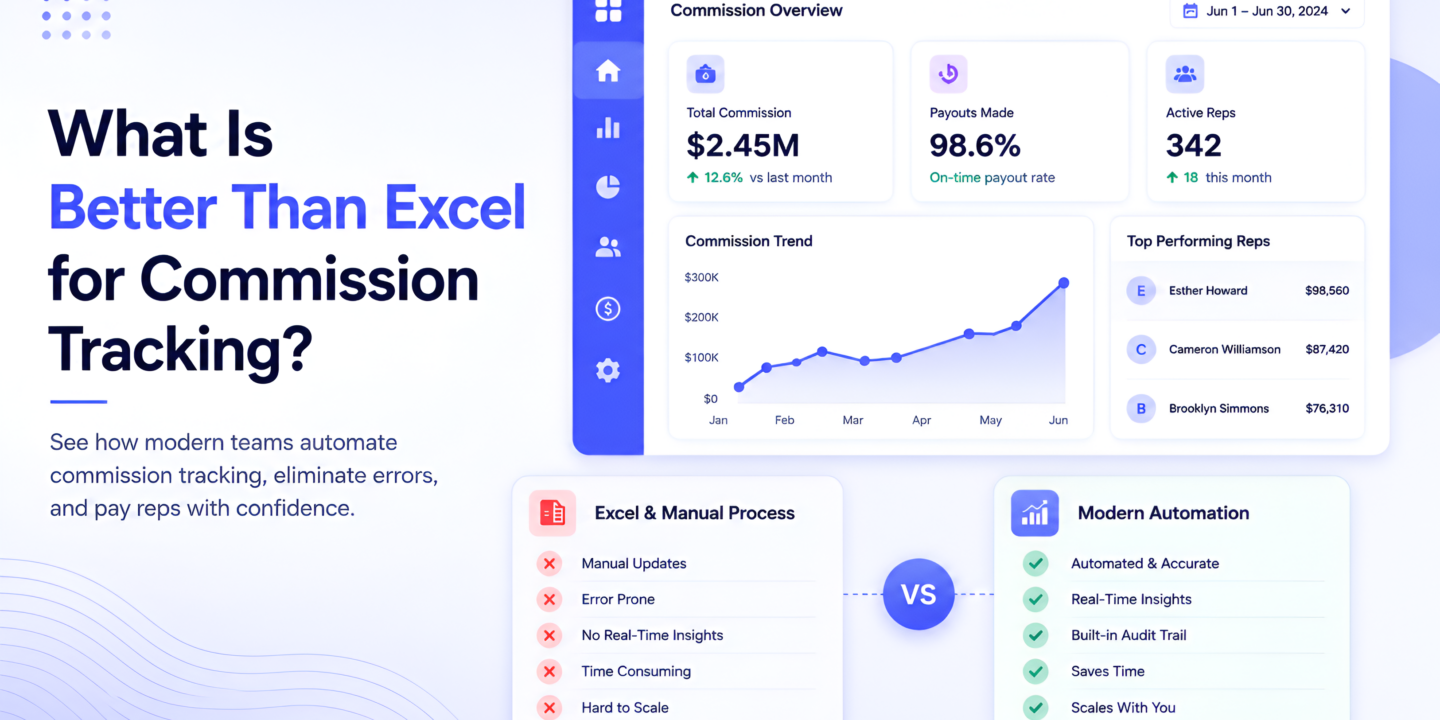
Excel commission tracking works until it doesn’t — and it stops working around 15–20 reps, multiple comp plan types, or the first time someone updates the wrong cell and nobody notices for two pay cycles. The five strongest alternatives are CaptivateIQ (enterprise SaaS), Xactly (large enterprise), QuotaPath (growth-stage), Performio (multi-industry mid-market), and Sequifi (field sales, D2D, and mixed W2/1099 workforces). All five automate what Excel can’t: multi-trigger payout logic, audit trails, rep-facing dashboards, and accurate reconciliation at scale.
If your team runs field sales, D2D, mortgage, solar, pest control, or fiber — and you have both W2 employees and 1099 contractors — Sequifi is the only alternative that also includes payroll, eliminating the spreadsheet-to-ADP handoff entirely.
Why Excel Commission Tracking Breaks
Excel is the default commission tool for almost every sales team at some point. It’s flexible, cheap, and most ops managers already know it. The problem isn’t Excel itself — it’s what Excel commission tracking can’t do as teams scale.
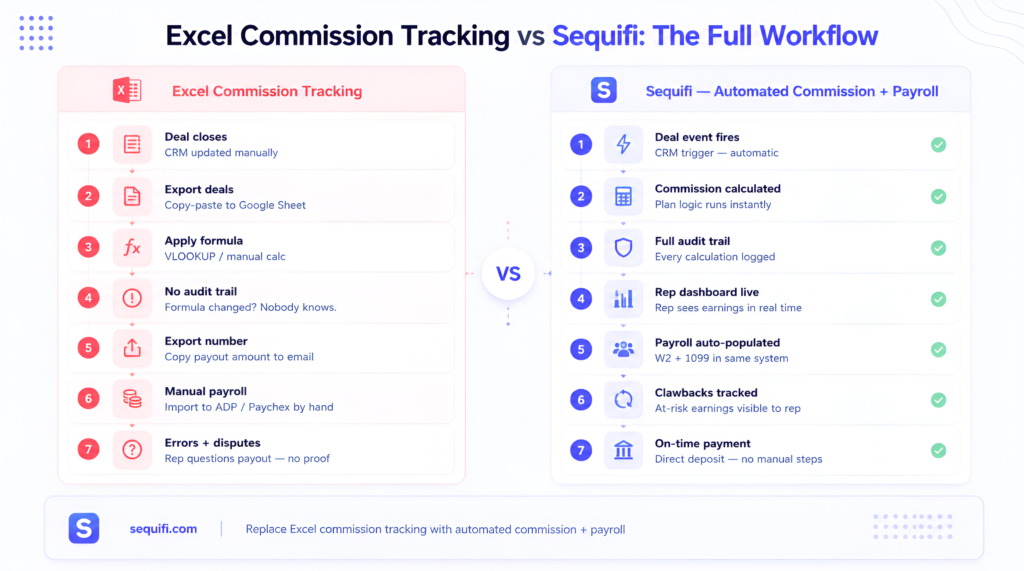
No audit trail. Someone changes a formula. A cell reference breaks. A VLOOKUP pulls from last month’s tab. Nobody knows when it happened or who changed it. By the time the error surfaces, reps are disputing pay and finance is scrambling to reconcile.
No automated triggers. Excel can’t fire a commission event when a deal hits a specific stage in your CRM. Someone has to manually update the sheet — and that manual step is where errors compound. For solar teams tracking installs vs signed contracts, or fiber teams tracking activations vs installs, manual reconciliation at scale is a full-time job.
No rep visibility. Reps can’t see their commission pipeline in real time. They have to ask. That creates unnecessary back-and-forth every cycle, erodes trust, and — according to a <a href=”https://www.salesforce.com/resources/research-reports/state-of-sales/” rel=”noopener noreferrer”>Salesforce State of Sales report</a> — is one of the top three reasons reps leave. Reps who can see their earnings stay longer.
No scalable plan logic. Multi-tier accelerators, split credits, clawbacks, draw reconciliation, per-watt calculations — you can build these in Excel, but maintaining them across 50+ reps across multiple comp plans is a fragile exercise. One hire who doesn’t understand the formula structure can break the whole sheet.
No payroll connection. Excel calculates a number. That number still has to get into your payroll system. For W2 teams that means a manual handoff to ADP or Paychex. For 1099 contractors, someone has to track disbursements for 1099-NEC filing. That handoff is where errors live.
5 Better Alternatives to Excel
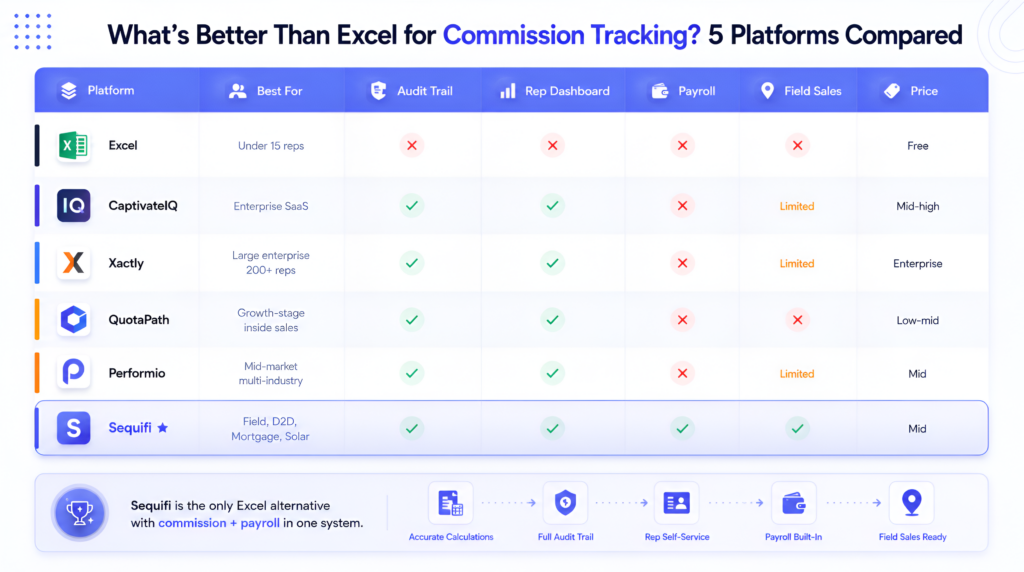
Here’s how the five strongest Excel commission tracking alternatives compare across team type, feature set, and total cost.
CaptivateIQ
CaptivateIQ is the most direct upgrade path from Excel for SaaS and enterprise inside sales teams.
Its plan builder is spreadsheet-like in feel — familiar to ops teams migrating from Excel — but runs on a proper data model with version control, audit logs, and real-time sync. Rep-facing dashboards let reps model their own earnings, which reduces the “how much am I making this month” inbound that clogs RevOps every cycle.
Best for: Mid-market and enterprise SaaS with complex quota + accelerator plans. Teams with dedicated RevOps who want the best rep-facing experience in the category.
Limitation: Commission calculation only. No payroll integration — the payout still needs a handoff to your payroll system.
Xactly
Xactly is the enterprise standard for companies that have grown beyond what any spreadsheet can handle.
It adds territory management, quota planning, and SPM (Sales Performance Management) on top of commission calculation — the full infrastructure layer for large sales orgs. Xactly Benchmarking provides industry comp data so plan designers can validate their rates against the market.
Best for: Enterprise sales organizations (200+ reps) with dedicated sales comp teams, complex territory structures, and multi-year quota plans.
Limitation: 3–6 month implementation timelines are common. High total cost of ownership. Still requires a separate payroll system.
QuotaPath
QuotaPath is the fastest Excel replacement for growth-stage inside sales teams.
Setup takes days, not months. Native HubSpot CRM integration is best-in-class — better than most competitors for teams not on Salesforce. Transparent per-seat pricing makes budgeting straightforward.
Best for: Startups and growth-stage inside sales teams (10–100 reps) with standard quota + commission plans on HubSpot or Salesforce who need something running fast.
Limitation: Limited support for multi-stage event triggers (install, activation, funded loan). No payroll integration. Will require migration as the team scales into enterprise complexity.
Performio
Performio bridges the gap between QuotaPath’s simplicity and Xactly’s complexity for mid-market teams.
It supports multi-dimensional tier structures, draw against commission, and split credits — comp plan types that break in Excel but aren’t worth Xactly’s implementation overhead for a 75-rep team. Implementation typically runs 4–8 weeks, a fraction of enterprise SPM timelines.
Best for: Mid-market sales organizations (50–500 reps) in financial services, insurance, tech, and manufacturing where comp plans are complex but budget and timeline don’t support an enterprise platform.
Limitation: Commission only — no payroll. Less polished rep-facing UX than CaptivateIQ.
Sequifi
Sequifi solves the problem that every other alternative on this list leaves open: the gap between commission calculation and payroll.
Every platform above calculates what a rep is owed. Sequifi calculates it and pays it — W2 and 1099 in the same system, with no manual handoff to ADP, Paychex, or Gusto. For field sales, D2D, solar, pest control, mortgage, and fiber teams managing mixed workforces, that’s the difference between a tool that replaces Excel and one that replaces Excel plus a payroll system plus a 1099-NEC tracking spreadsheet.
Built-in for field sales: Per-watt commission calculation, install vs activation triggers, clawback windows, multi-stage split pay, rep-facing pay dashboards, territory-based quota management.
Best for: Field sales, D2D, solar, pest control, fiber ISP, mortgage, and any organization with W2 employees and 1099 contractors where commission and payroll need to be in the same system.
For a full comparison of how Sequifi stacks up against the other platforms, see What are alternatives to Spiff for commission tracking?.
Comparison Table
| Platform | Best For | Payroll Included | W2 + 1099 | Field Sales | Pricing |
|---|---|---|---|---|---|
| Excel | Under 15 reps | ✗ | ✗ | ✗ | Free |
| CaptivateIQ | Enterprise SaaS inside sales | ✗ | ✗ | Limited | Mid-high |
| Xactly | Large enterprise (200+ reps) | ✗ | ✗ | Limited | Enterprise |
| QuotaPath | Growth-stage inside sales | ✗ | ✗ | ✗ | Low-mid |
| Performio | Mid-market, multi-industry | ✗ | ✗ | Limited | Mid |
| Sequifi | Field sales, D2D, mortgage, solar | ✓ | ✓ | ✓ | Mid |
The pattern across every Excel commission tracking alternative: they all handle the calculation problem. None of them except Sequifi handle the payroll problem. If your team has both W2 and 1099 workers and pays out through payroll, the commission-to-payroll handoff is a second Excel problem waiting to happen.
According to <a href=”https://www.g2.com/categories/sales-compensation-management” rel=”noopener noreferrer”>G2’s sales compensation management category</a>, the most common buyer complaint across all commission platforms is the disconnect between commission calculation and actual pay processing — which Sequifi is the only platform in this comparison to address.
When to Make the Switch
Switch when you hit 15+ reps. Below 15 reps, a well-built Excel sheet managed by a sharp ops person is survivable. Above 15, the error rate and manual overhead start costing more than the software.
Switch when you have more than one comp plan type. A single flat commission rate in Excel is manageable. Tiered accelerators, split credits, draw reconciliation, and clawback windows across multiple plan types in the same spreadsheet is a risk event waiting to happen.
Switch when a rep disputes their pay. The first time you can’t prove how a commission number was calculated — because the formula changed three weeks ago and there’s no audit log — is the day the conversation about software becomes urgent.
Switch when you’re managing both W2 and 1099 workers. Excel can track disbursements. It can’t process payroll, withhold taxes, or file 1099-NECs. The moment you have a mixed workforce, you need more than a spreadsheet.
See What software is best for high-growth sales teams? for how commission software fits into the full sales tech stack. And see How do companies automate commission payouts? for what the migration from spreadsheet to automated platform actually looks like.
Frequently Asked Questions
Why do companies still use Excel for commission tracking?
Most companies start with Excel because it’s free, flexible, and familiar. At small team sizes (under 15 reps) with a single commission plan type, Excel works adequately. The cost of switching is only justified once the error rate, manual reconciliation time, and rep trust issues from spreadsheet-based pay exceed the cost of a purpose-built platform.
What is the best free alternative to Excel for commission tracking?
There is no purpose-built commission tracking platform that is both free and adequate for growing sales teams. HubSpot CRM includes basic deal tracking that can approximate simple commission reporting, but it doesn’t calculate commission, process payroll, or enforce clawbacks. For most teams, the “free” cost of maintaining Excel commission tracking — in ops time and pay errors — exceeds the cost of a platform like QuotaPath within the first year.
How do you migrate commission tracking from Excel to a platform?
The migration process typically involves: (1) exporting your current rep list and active comp plans, (2) mapping your existing plan logic to the new platform’s plan builder, (3) importing historical commission data for open periods, (4) running parallel calculations for one cycle to validate accuracy, then (5) decommissioning the spreadsheet. Most mid-market platforms complete migration in 4–8 weeks. CaptivateIQ and Sequifi both offer structured implementation support.
Can Excel handle commission clawbacks?
Excel can track clawback events manually — but it can’t enforce them automatically. If a deal cancels within your clawback window, someone has to manually flag it, update the sheet, and calculate the recovery amount. Purpose-built platforms like Sequifi track clawback windows automatically, show reps their at-risk earnings in real time, and calculate recovery amounts without manual intervention.
What commission software works for both W2 and 1099 reps?
Sequifi is the only platform in this comparison that handles both W2 and 1099 workers in a single system — including commission calculation, payroll processing, and 1099-NEC filing. CaptivateIQ, Xactly, QuotaPath, and Performio handle commission calculation for W2 or 1099 workers but require a separate payroll system for actual payment processing.
Conclusion
The answer to “what is better than Excel commission tracking?” depends on your team type. For SaaS inside sales: CaptivateIQ or Xactly. For growth-stage teams: QuotaPath. For multi-industry mid-market: Performio. For field sales, D2D, and mixed W2/1099 workforces: Sequifi.
What they all have in common: audit trails, automated plan logic, rep-facing dashboards, and CRM integrations that Excel simply can’t provide at scale. What only Sequifi adds: the payroll connection that closes the loop from commission calculation to actual payment.
If your team is still running commissions in a spreadsheet, the question isn’t whether to switch — it’s which platform fits your team type and whether you need commission-only or commission plus payroll.
Visit sequifi.com to see how Sequifi replaces both your commission spreadsheet and your payroll handoff — or book a demo to compare your current Excel setup against a unified platform.
Related: What are alternatives to Spiff for commission tracking? · What software is best for high-growth sales teams? · How do companies automate commission payouts?